Network Paths: LAN, Direct, Bridge
Why your connection says lan, direct, or bridge, and what that means.
The ladder
KeibiDrop tries the fastest path first and falls back in order:
- LAN: both peers are on the same local network.
- Direct: a peer-to-peer connection across the internet, over IPv6.
- Bridge: both peers dial out to a forwarding server that splices their encrypted streams.
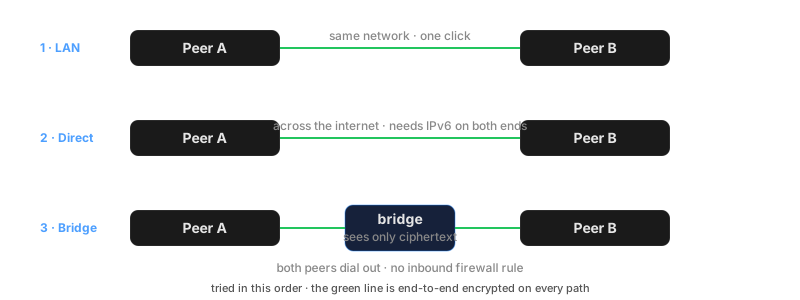
Every path carries the same end-to-end encryption. The path changes latency and speed, never confidentiality. The current path shows in the app's mode badge and in kd status as connection_mode.
LAN
On a shared network, peers find each other by a multicast announcement (UDP group 224.0.0.167, port 26999) and appear under temporary names. One click connects. Trust here is on first use: there is no fingerprint exchange, so connect to devices you recognize.
Networks with client isolation, which is the norm for guest and hotel WiFi, block both multicast and device-to-device traffic. On such networks the LAN rung does not exist, and the ladder continues below.
Direct
Across the internet, a direct connection needs both sides to reach each other. KeibiDrop does not do IPv4 NAT traversal; the direct path uses IPv6, where every device has a reachable address. Both peers need working IPv6 (test-ipv6.com score 9 or 10).
The connection attempt gives the direct path a 15 second window. Whether your network can accept inbound connections is remembered, so the wait happens once per network instead of on every connect.
Bridge
When direct is impossible, no IPv6, client isolation, restrictive firewall, both peers connect outward to the bridge, and it forwards their bytes. Outbound-only is the point: almost every network allows outbound connections, so the bridge works from hotel WiFi, corporate guest networks, and mobile hotspots without any configuration.
The bridge sees ciphertext. It cannot read file content or names. The measured cost of the extra hop is about 9% against a LAN path, and bulk transfers over an intercontinental bridge sustain 33 to 37 MB/s (conditions).
The relay's role
The relay is not on the data path. It is the meeting point: during pairing, each side deposits an encrypted note under an opaque key derived from the fingerprint, and fetches the peer's note. After the handshake, the relay is out of the picture. What it can and cannot observe is specified in the security model.
The free relay allows about 3 connection attempts per 5 minutes.
If the relay is unreachable, a session that is already open keeps running, and peers on one local network still find each other by the multicast announcement. A new pairing across networks waits until the relay answers again.
When you would use strict_mode
strict_mode = true removes the bridge rung: connections are direct or they fail. Use it when your policy forbids traffic through third-party servers, and accept that unfriendly networks then produce failures instead of fallbacks. It is a policy switch: it decides which routes are allowed, and leaves speed to the link.