Their files, as a folder
on your computer

Open, edit, and stream files from another device without downloading them first. Encrypted peer-to-peer. No cloud. No accounts.

macOS
Linux
Windows
brew tap keibisoft/keibidrop
brew install keibidrop

Or download from GitHub Releases. FUSE mode needs macFUSE.

wget https://github.com/KeibiSoft/KeibiDrop/releases/latest/download/keibidrop_amd64.deb
sudo dpkg -i keibidrop_amd64.deb

Or grab the binary from GitHub Releases. FUSE mode: sudo apt install fuse3

choco install keibidrop

Or download from GitHub Releases. FUSE mode needs WinFsp.

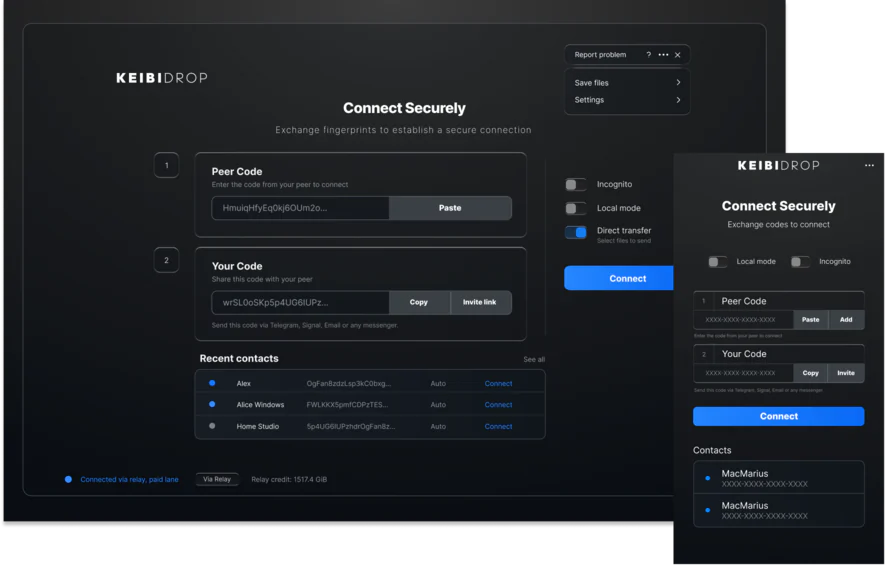
KeibiDrop connection screen where you exchange codes

Stream a 600 MB video from a peer via FUSE — plays before the transfer finishes

What it does

KEIBIDROP solves a specific problem: getting files from one device to another without uploading them to someone else's server.

Unlimited transfers

Any file size, any number of files, no bandwidth quota. Send a 5 KB config or a 500 GB database dump. Incomplete transfers resume automatically when the same peer reconnects.

Stream on demand

In virtual folder mode, files are streamed on access. Open a 4 GB video and it starts playing immediately. The full file downloads in the background.

Post-quantum encryption

ML-KEM-1024 + X25519 hybrid key exchange. AES-256-GCM or ChaCha20-Poly1305 for data. The relay, if used, forwards bytes it cannot decrypt.

Direct connection

Files travel directly between devices. There is no upload-then-download step. On a local network, it saturates gigabit ethernet.

Internet and LAN

On the same WiFi, devices discover each other automatically via Bonjour. On different networks, they connect through an encrypted relay.

Every platform

macOS, Windows, Linux, Android, iOS. Desktop GUI for regular use, CLI for scripting and servers, agent mode for automation. Shared files persist across app restarts.

Two modes

Pick files and send them directly, or mount a shared folder that both peers can read and write to.

Direct Transfer

Drag files in. Your peer saves what they need.

KeibiDrop direct transfer mode showing shared files between peers

Virtual Folder (FUSE)

Peer files appear as a folder. Open in any app.

KeibiDrop virtual filesystem mode with shared folder mounted

It behaves like a real folder

The shared mount is a standard filesystem. Your file manager, terminal tools, git, rsync, IDEs all work on it.

KeibiDrop FUSE flow: connect, mount, use any app, auto-synced
KeibiDrop shared folder visible in macOS Finder

Peer's files visible in Finder. Open, copy, or stream them.

Git clone, log, and status working on the KeibiDrop FUSE mount

git clone, git log, git status all work over the shared mount.

Browse your peer's folders

In direct transfer mode, directories show up as navigable folders. You can drill into them and save individual files.

Browsing a git repository received from a peer in KeibiDrop

Browsing a git repository received from a peer. Folder structure, source files, and docs all preserved.

Security details

The code is open source and the cryptography is auditable.

Post-quantum key exchange

Key exchange uses ML-KEM-1024 + X25519 (hybrid, so it is secure against both classical and quantum attacks). Data encryption uses AES-256-GCM or ChaCha20-Poly1305, negotiated per session. When a relay is involved, it forwards encrypted bytes that it cannot decrypt. The full engine is open source under MPL-2.0.

How it works

Direct when possible. Encrypted relay as fallback.

KeibiDrop architecture: Device A connects directly to Device B with post-quantum encryption, relay as fallback

Comparison

KeibiDrop is the only open-source tool that combines internet connectivity, cross-platform support, and a virtual shared folder.

KeibiDrop croc LocalSend Syncthing
Works over the internet Yes Yes LAN only Yes
Virtual folder (FUSE) Yes No No No
Post-quantum encryption ML-KEM-1024 PAKE only TLS TLS
Encrypted transfer speed ~610 MB/s ~150 MB/s ~700 MB/s ~200 MB/s
No account needed Yes Yes Yes Yes
Agent / automation CLI JSON API No No REST API
Git clone on shared files Yes No No No
Cross-platform All platforms All platforms All platforms All platforms
Open source MPL-2.0 MIT MIT MPL-2.0

Runs on everything

Same protocol and encryption on every platform.

macOS Windows Linux Android iOS CLI

Desktop app with GUI. CLI for scripting and servers. Agent mode for automation pipelines.

Open source · MPL-2.0 · No telemetry · No accounts