How KeibiDrop Works
What happens under the shared folder.
Sessions and the shared folder
A KeibiDrop session is exactly two computers. That is a design decision, and it holds on every tier. With two writers, the question "whose version of this file is newer" has a single, checkable answer, and KeibiDrop's sync logic is built on that answer being reliable. The two-peer engine is verified with model checkers that enumerate the possible orderings of writes and deliveries.
Both sides run the same engine. When you connect, each side shares the files and folders it chose to share, and sees the other's shared files inside its own shared folder. To your programs, that folder is a normal folder. To the operating system, it is a virtual filesystem (FUSE) that KeibiDrop serves.
Streaming on demand
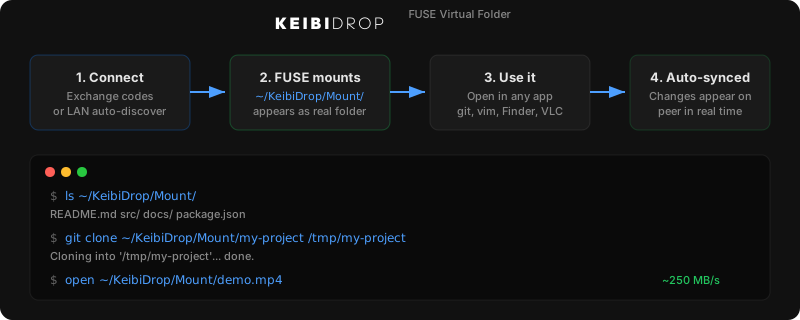
When a file appears in your shared folder, only its description has arrived: name, size, timestamps. The content is still on the peer.
The content moves when something reads the file. A read fetches the needed blocks (16 MiB at a time), and sequential reading keeps a window of upcoming blocks in flight, so video playback and large copies do not pause at block boundaries. The window sizes itself to the reader: a media player stays small, a bulk copy fills the link.
This is why a folder with 100 GB of shared files appears instantly, and why you can open a 40 GB video and scrub it without downloading 40 GB first. Blocks that arrived are cached, and an interrupted download resumes from its bitmap instead of starting over.
The tradeoff is honest: there is no offline copy unless you read or pull the file. When the peer is offline, bytes you never fetched are not on your disk. An offline cache mode is planned; today, use pull or a copy for files you need without the peer.
Edits flow back
When you save a file in the shared folder, your side announces the new version to the peer, and only the changed part of the file is transferred. When both sides edit the same file at the same time, the newer save wins the name and the other version is preserved as a conflict file on both computers. Nothing is lost silently; the rules are described in Edits, versions, and conflicts.
Your identity is a fingerprint
There are no accounts. An installation's identity is a key pair, and the fingerprint (the 86-character code you exchange when pairing) identifies it. Whoever holds your fingerprint can attempt to connect to you; the cryptographic handshake then proves that the other side really owns the fingerprint you registered. This is why the docs say to send the code over a channel you trust: the exchange is the trust decision.
Saved contacts keep a peer's fingerprint, so a later connection needs no new exchange. Incognito mode uses a throwaway identity and writes nothing to disk.
The relay and the bridge
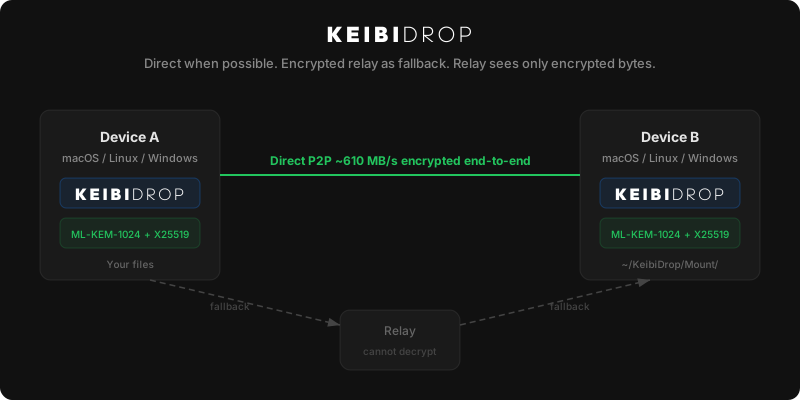
Two small servers exist so that pairing and unfriendly networks work. Neither can read your files.
- The relay is a pairing directory. Each side deposits an encrypted note that only a holder of the fingerprint can decrypt, telling the peer where to connect. The relay stores opaque blobs against opaque keys.
- The bridge is a byte forwarder. When no direct connection is possible (no IPv6, or a network that blocks device-to-device traffic), both sides dial out to the bridge and it splices the two encrypted streams together. It sees ciphertext.
The order of attempts is: same network first, then direct over the internet, then the bridge. The full ladder, with its timings, is in Network paths. What the servers can and cannot observe is stated precisely in the security model.
Interfaces
The desktop app (keibidrop), the terminal client (keibidrop-cli), and the scripting CLI (kd) run the same engine. They read the same configuration file and create the same identity. A desktop app on one computer connects to a kd daemon on the other. On a server or in an AI agent, use kd.