Work Through Firewalls and Guest WiFi
Nothing to open, one thing to check, and what to expect on hostile networks.
Check IPv6 first
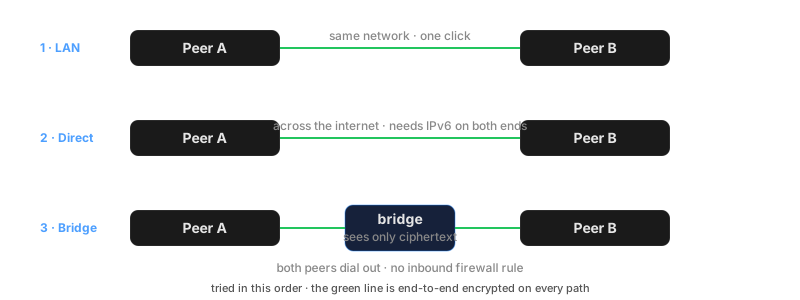
Direct peer-to-peer connections use IPv6. To know which path you will get, test both ends at test-ipv6.com; a score of 9 or 10 means the direct path is available. Without IPv6 on both ends, connections take the bridge, which works everywhere but adds a hop.
Nothing to open inbound
If direct fails, both peers dial out to the bridge, and the bridge forwards their encrypted streams. Outbound connections pass almost every firewall, so KeibiDrop needs no port forwarding and no router changes, ever. The bridge cannot read your files.
If you control the firewall and want direct connections, allow inbound TCP on your inbound port (default 26431). Peers connect either way; the open port only lets them skip the relay.
On guest and hotel WiFi
Guest networks usually isolate clients: devices cannot see each other at all. Expect this behavior:
- LAN discovery finds nothing, even with both laptops on the same WiFi. Use the fingerprint exchange instead (how).
- The first connect takes about 17 seconds: the direct attempt times out, then the bridge takes over. KeibiDrop remembers the result, so later connects on that network skip the wait.
- After that, everything works normally through the bridge.
On a corporate network
For an allow-list, KeibiDrop needs outbound only:
| Destination | Protocol | Purpose |
|---|---|---|
keibidroprelay.keibisoft.com | HTTPS (443) | Pairing |
bridge.keibisoft.com:26600 | TCP | Fallback data path |
bridge.keibisoft.com:26600 | UDP | QUIC control lane for small reads while the bridge carries the data. Optional: without it the session stays on TCP. |
| Peer addresses, ports 26000-27000 | TCP | Direct data path |
| Peer addresses, ports 26000-27000 | UDP | QUIC control lane on a direct connection, on the same port as the TCP path. Optional: without it the session stays on TCP. |
All traffic inside these connections is end-to-end encrypted; a TLS-inspecting proxy cannot read file contents either, though it can block the connection.
Force direct only (strict_mode)
If policy forbids third-party forwarding, set strict_mode = true in the config file. Connections are then direct or they fail; there is no bridge fallback. On networks where direct is impossible, this means no connection, by design.